
Most conversations about AI agents are about what the model can do. The harder question is what it is allowed to do. An agent that holds cloud credentials, calls any tool it likes and runs code it wrote itself is not a product. It is an incident waiting for a date.
So when AWS ran Secure AI Agents on Amazon EKS, a hands-on workshop for platform and ML engineers, I wanted to see how AWS thinks that question should be answered on Kubernetes. This isn't a walkthrough: the workshop is AWS's, and I credit it at the end. These are my notes on what we built, what surprised me, and the gaps worth knowing before you copy the pattern.
If you read my earlier post on what an AWS platform engineering lab taught me, this is its sequel. That one was about shipping applications safely. This one is about shipping agents safely, and it turns out to be the same idea one level up.
The one idea that ties it together#
We built a single customer-service agent for a fictional online shop and grew it lab by lab: first a reasoning loop with one tool, then tracing, then tools over the network, then per-user permissions, then a sandbox for code the model writes, and finally a coding agent that turns a git issue into a pull request on its own.
Here is the lesson in one sentence: the agent's code barely changed. The platform around it did all the work.
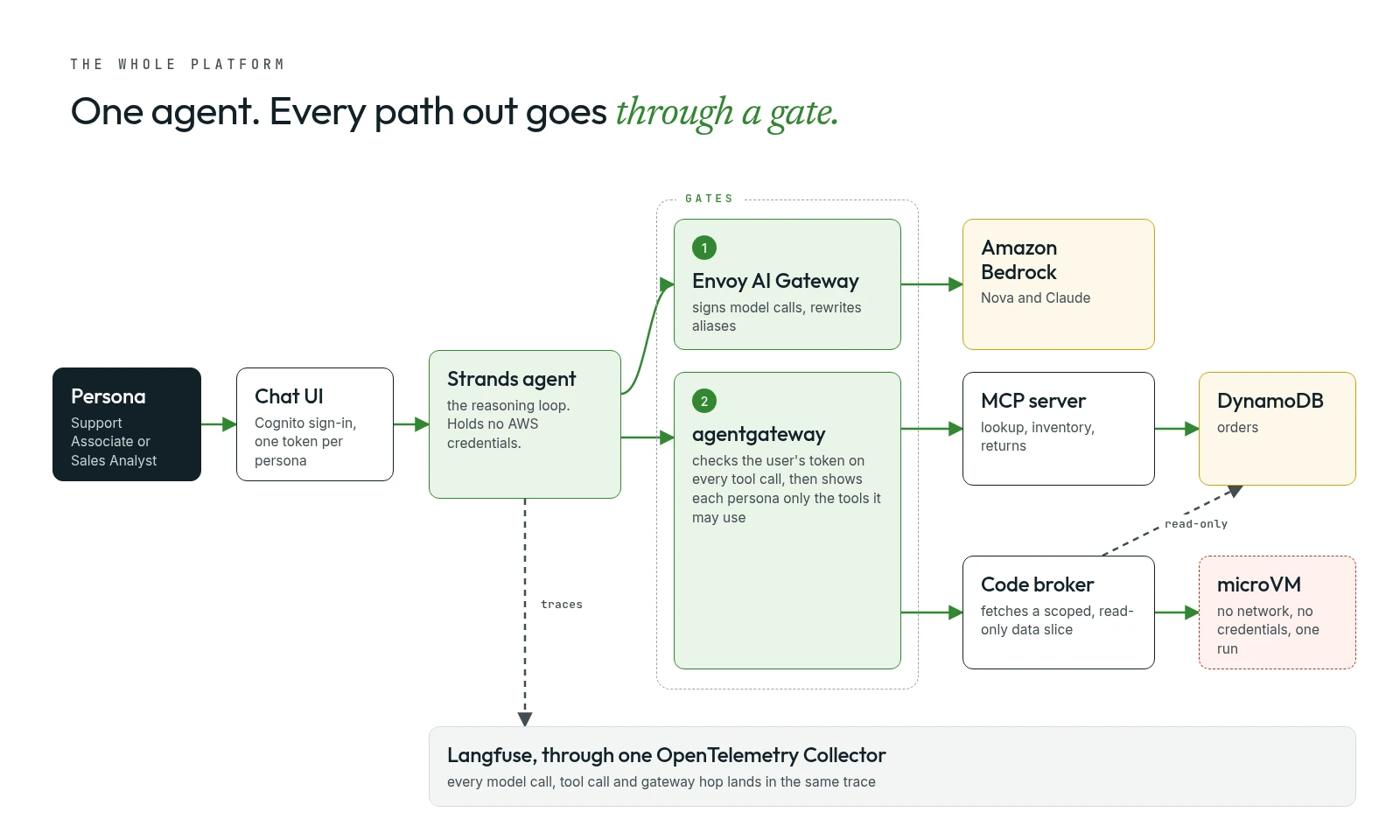
Every path out of the agent goes through a gate the platform team owns. Models through one gateway, tools through another, code through a sandbox. The agent itself ends the day holding no AWS credentials at all. Each section below is one gate, and the question I kept asking was the same: what attack or failure does this stop?
Gate 1: a model gateway, so agents hold no credentials#
Before writing any agent, we called the model the way every workload in the cluster would: through the Envoy AI Gateway, a proxy running inside the cluster in front of Amazon Bedrock. It is a ClusterIP service, so it has no address outside the cluster, and you reach it from a throwaway pod:
kubectl run gw-test --rm -i --restart=Never --image=curlimages/curl -q -- \
  curl -sS http://ai-gateway.envoy-gateway-system.svc.cluster.local/v1/chat/completions \
  -H 'Content-Type: application/json' \
  -d '{"model":"nova-lite","messages":[{"role":"user","content":"Say hi in 3 words"}]}' | jq
A small detail I liked: jq sits outside kubectl run on purpose. The curl image has no jq, so the pod streams its output back to your shell and your machine does the formatting.
The answer is the interesting part:
{
  "choices": [{ "message": { "content": "Hello there, friend!", "role": "assistant" } }],
  "model": "us.amazon.nova-2-lite-v1:0",
  "usage": { "prompt_tokens": 9, "completion_tokens": 6, "total_tokens": 15 }
}
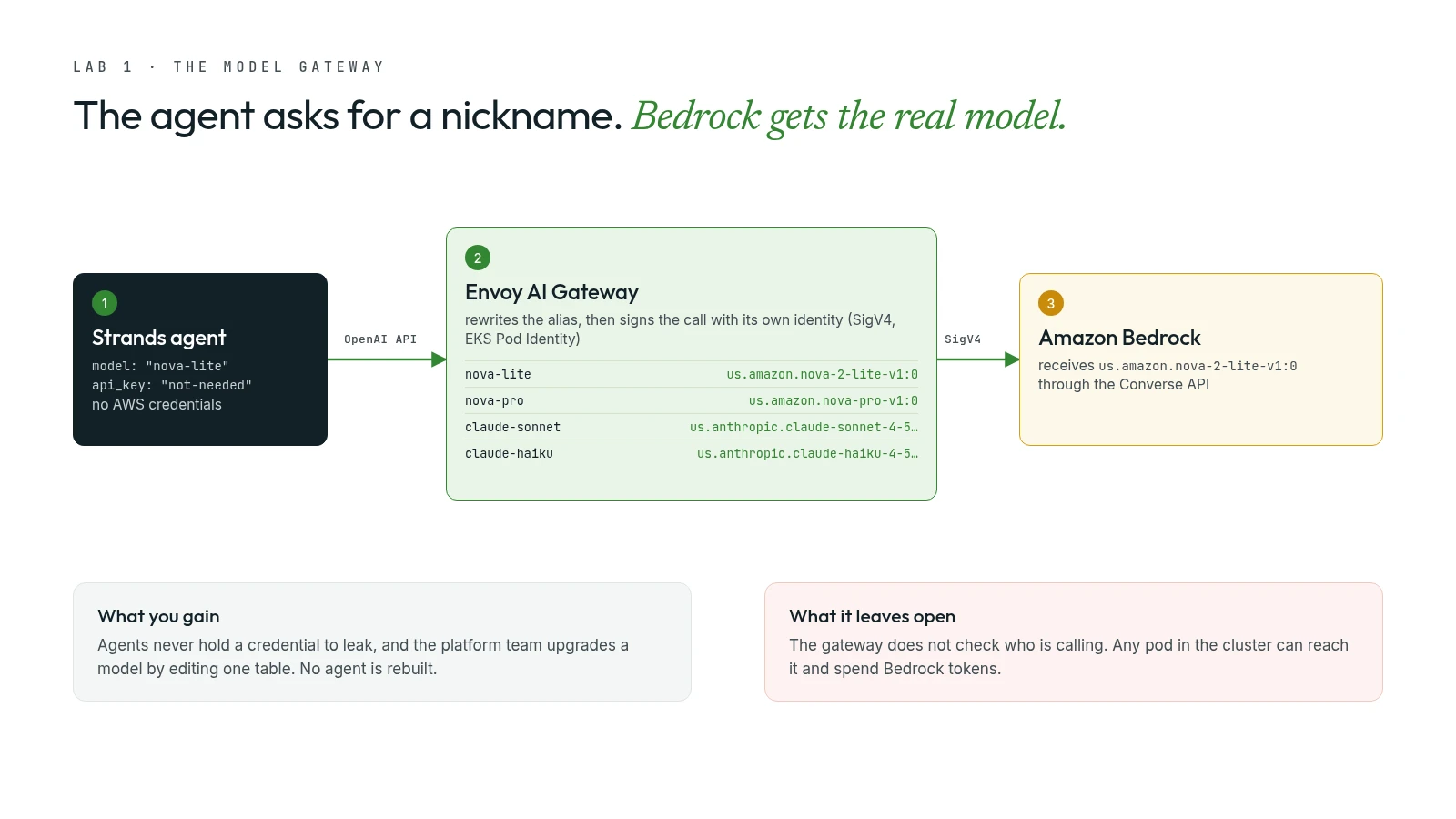
I asked for nova-lite. Bedrock answered as us.amazon.nova-2-lite-v1:0. The gateway keeps a table of friendly names and rewrites each one to a real model ID:
nova-lite     -> us.amazon.nova-2-lite-v1:0
nova-pro      -> us.amazon.nova-pro-v1:0
nova-micro    -> us.amazon.nova-micro-v1:0
claude-sonnet -> us.anthropic.claude-sonnet-4-5-20250929-v1:0
claude-haiku  -> us.anthropic.claude-haiku-4-5-20251001-v1:0
Three things fall out of putting a gateway here:
- The agent holds no AWS credentials. The gateway signs each request with SigV4 using a role granted through EKS Pod Identity. An agent that never holds a credential cannot leak one, not even through a cleverly worded prompt.
- Model names stop being an application concern. When the platform team moves
claude-sonnetto a newer release, they edit one table. No agent is rebuilt, redeployed or reviewed. - There is one place to see and shape model traffic. Rate limits, per-team token budgets and cost accounting all belong at this hop.
The gateway also speaks two dialects: the OpenAI format on /v1/chat/completions and Anthropic's Messages format on /anthropic/v1/messages. Which one you use becomes a client-library decision, not a platform one. The agents use the OpenAI path; Claude Code, later, uses the Anthropic one.
What it leaves open. The agent's client sets api_key="not-needed", and that phrase hides two questions. Does the gateway need a key to reach Bedrock? No, it has its own identity. Does it check who is calling it? Also no. Any pod in any namespace can reach that URL and spend Bedrock tokens; the only boundary is that the service is internal to the cluster. In production I'd close that with caller authentication (projected service-account tokens) and a network policy. It's the first of several places where the workshop is honest about what a lab skips, and I'll keep pointing them out.
The agent itself is small#
The first agent uses the open-source Strands Agents SDK. Its model client is entirely environment-driven, so the same container runs anywhere:
model = OpenAIModel(
    client_args={
        "base_url": os.environ.get("MODEL_BASE_URL", "http://localhost:4000/v1"),
        "api_key": os.environ.get("MODEL_API_KEY", "not-needed"),
    },
    model_id=os.environ.get("MODEL_ID", "nova-lite"),
    params={"max_tokens": 1024, "temperature": 0.3},
)
Switching the agent to Claude is a one-line change to MODEL_ID. The one tool, lookup_order, reads an order from DynamoDB. Notice the split in identities: model access needs no credentials thanks to the gateway, but data access uses the agent's own Pod Identity role. Two different trust paths, and keeping them separate matters later.
Asked about a delayed laptop, it called the tool and answered with the status, tracking number and an estimated delivery date of 8 July 2026. Then it added that the package should arrive "in about 3 weeks from today".
That sentence is wrong, and it is a useful kind of wrong. The model has no reliable idea what today's date is, so any relative date it produces is a guess dressed up as a fact. The fix is boring and important: pass the current date into the system prompt, or better, have tools return computed values ("arrives in 12 days") so the model never does date arithmetic. Keep that in mind; it comes back in the sandbox lab.
Making the black box visible#
Next we instrumented the agent with OpenTelemetry and sent the traces to Langfuse, running in the same cluster. The change to the agent was tiny: a Langfuse client, and starting the app with opentelemetry-instrument, which patches FastAPI and the HTTP client without touching your code.
Two design choices here are worth stealing:
- One collector, one credential. The agent and the gateway both export to a shared OpenTelemetry Collector, which is the only thing holding the Langfuse API key. Credentials live in one place, not in every workload.
- One request, one trace. The agent forwards the W3C
traceparentheader on its model calls, so the gateway's own span nests inside the agent's trace. In a single tree you see the agent ask fornova-liteand the gateway resolve it tous.amazon.nova-2-lite-v1:0.
Reading a real trace taught me more than any slide:
- One question costs two model calls. The first decides to call
lookup_order; the second writes the answer from the result. - The whole request took about 1.5 seconds and cost about $0.0013 on Nova 2 Lite. The DynamoDB tool call took 0.04 seconds.
- Input dominates the bill. Each model call sent roughly 1,100 to 1,300 tokens for a one-line question, against 30 to 156 tokens out. The system prompt and tool definitions ride along on every call, and every tool you add makes them bigger.
One trap: the gateway's span is named ChatCompletion, not envoy-ai-gateway, so searching for the gateway's name finds nothing. Also, each Langfuse page has its own time-range picker. A dashboard showing "No data" usually means the range, not missing traces.
Gate 2: tools on the network, behind a gateway that understands them#
A tool inside the agent's process ships with that agent, can't be shared, and has no central place to decide who may call it. The fix was to move the tools to a standalone server speaking the Model Context Protocol (MCP). The agent connects, asks for the list of tools, and calls them by name. It no longer imports any tool code.
@mcp.tool()
def lookup_order(order_id: str) -> dict:
    """Look up order status, tracking, and details by order ID."""
The server gained two more tools, check_inventory and initiate_return, and the calls go through agentgateway, an MCP-aware proxy. "MCP-aware" is the whole point: because it speaks the protocol, it sees individual tools/list and tools/call operations instead of opaque HTTP bodies. That is what makes per-tool permissions possible. It's configured the Kubernetes way, with an ordinary Gateway API HTTPRoute, and Amazon Bedrock AgentCore Gateway is the managed equivalent if you'd rather not run one.
After my first chat message, the agent's log showed the discovery:
Discovered 3 MCP tools at http://agentgateway.agentgateway-system.svc.cluster.local/mcp:
['lookup_order', 'check_inventory', 'initiate_return']
It appears only after the first message, not at startup, because the agent now builds its MCP client per conversation so it can forward the signed-in user's Cognito token on every tool call. Identity now travels with each call. That plumbing is what the next gate enforces.
Two details I appreciated:
- Least privilege moved with the tools. The MCP server now holds the DynamoDB permissions. The agent runs under a service account with no AWS permissions at all.
- The workshop admits its own shortcut. We seeded the product catalogue by piping a script into the agent's pod, which gives the agent write access it doesn't need. The right way is a Kubernetes Job that alone holds write credentials, leaving the agent read-only. I'd rather learn from a lab that names its compromises than one that hides them.
The fourth tool, search_products, stayed inside the agent and does vector search over the catalogue in Milvus. Ask "what do you have for cutting down background noise on calls?" and it finds the noise-cancelling headphones even though no word in the question matches the product name.
A reading tip from my traces. Once MCP was in the path, one trace reported the request as taking 3 minutes 47 seconds. The agent had answered in 2.3. The difference was a long-lived GET stream that MCP's streamable HTTP transport keeps open for the session, and it stretched the root of the trace. With streaming MCP sessions, measure the agent's own span, not the trace total.
Gate 3: permissions per person, enforced at the gateway#
Now the forwarded token becomes real access control, without changing a line of agent or tool code. The shop has two personas, carried as a cognito:groups claim in the user's token:
| Persona | Group | May |
|---|---|---|
| Support Associate | support-associate | look up orders, process returns |
| Sales Analyst | sales-analyst | look up orders only |
Two policies attach to agentgateway. mcp-authn validates the Cognito JWT on every call against the user pool's public keys; a missing or invalid token gets a 401 before any tool runs. mcp-tool-authz maps each tool to the groups allowed to call it: lookup_order for both, initiate_return for support only, and check_inventory for nobody, deliberately, to show that once any rule exists, everything not allowed is denied.
The first policy in the exercise is a neat trick: a single Allow rule whose condition is the literal string 'false'. It matches nothing, and because any rule switches on deny-by-default, it denies every tool. A file that says "Allow" and blocks everything is a good reminder to read policies, not just their names.
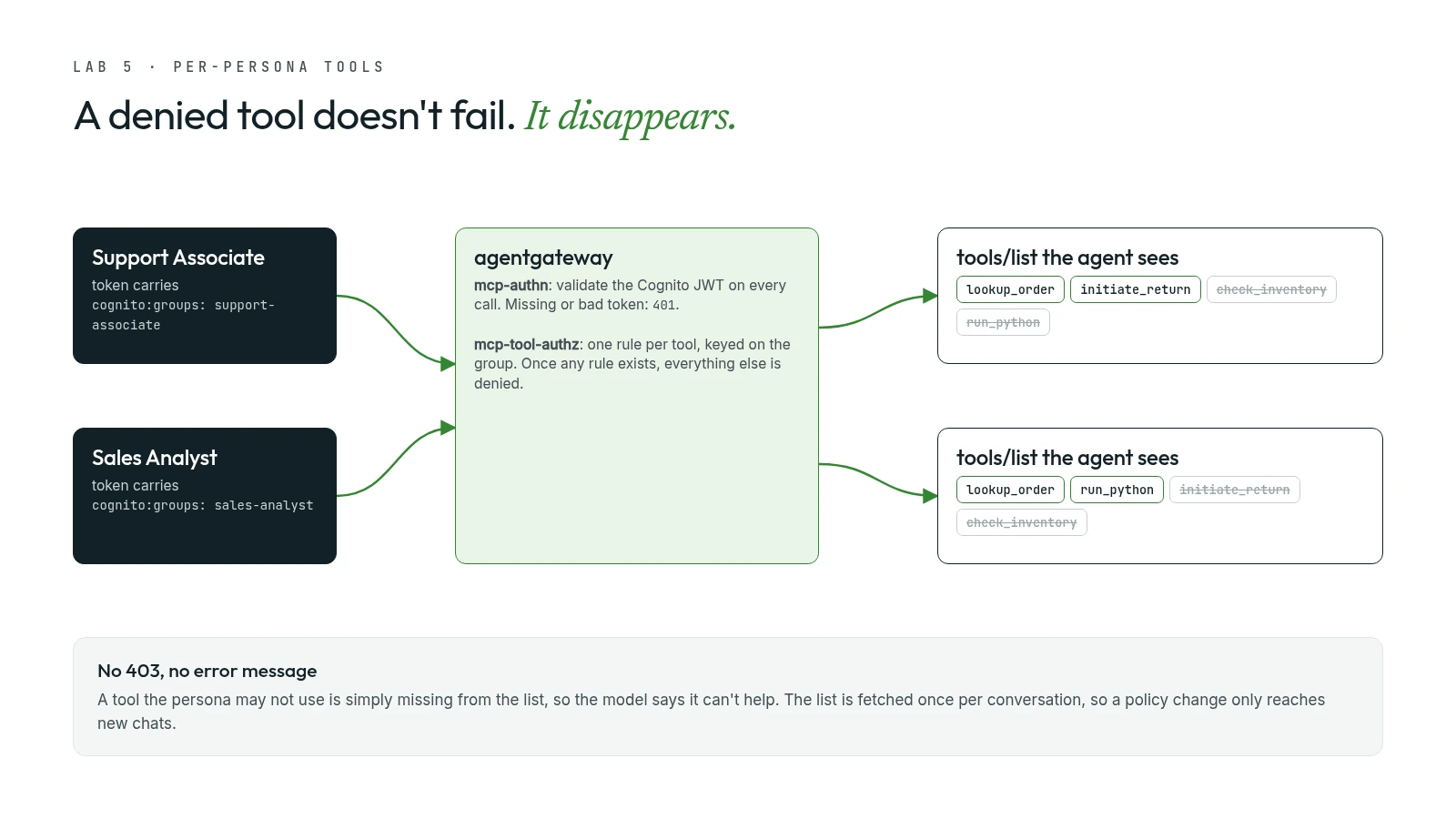
What surprised me most was how a denial looks. There is no 403 and no error message. agentgateway simply removes the tool from that persona's tools/list, so the agent never knows it exists, and the model replies that it can't help with that. Signed in as the Support Associate and asked for a sales chart, the agent listed exactly what it could do: search products, look up orders and process returns. No inventory check, and no code sandbox.
The second surprise needs care, and I got it wrong in the first version of this post. The agent fetches its tool list once per conversation and caches it, which is why the lab tells you to start a new chat after each policy change. I first read that as "removing someone's access doesn't reach a conversation already in progress". Then I rebuilt the setup on my laptop and tested it: with a conversation still open, I deleted a persona's rule for a tool and called the tool again from the same session. agentgateway refused the call immediately, because it checks every tools/call, not just the list. What the cache really delays is the opposite direction: a newly granted tool doesn't appear until the next conversation. Removing access is enforced on the next call; adding access waits for a new chat. That is the safe way round.
Gate 4: a disposable VM for code the model writes#
The tools so far answer fixed questions. A Sales Analyst asks open-ended ones like "chart last month's sales by region", and no fixed tool answers that. You could paste a few hundred orders into the prompt and ask the model to add them up, but that's slow, expensive and unreliable: models are bad at arithmetic over long lists. Writing df.groupby('region')['total'].sum() and running it is exact and cheap.
The catch is that model-written code is untrusted code. So the agent gets one new tool, run_python, and the code never runs in the agent.
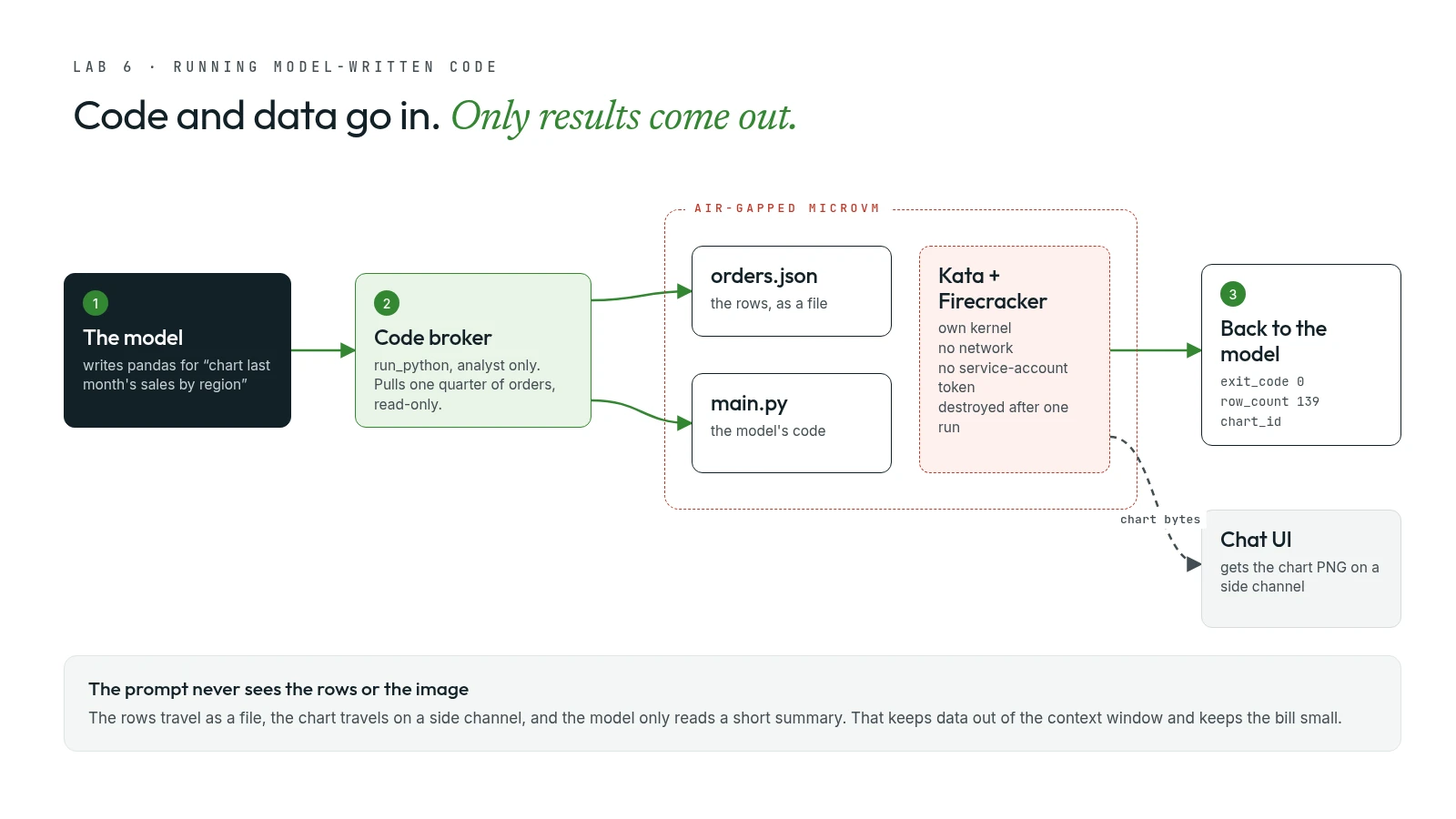
run_python calls a broker that:
- fetches a scoped, read-only slice of orders from DynamoDB;
- claims a fresh Kata Containers microVM: to Kubernetes it looks like a container, but underneath it boots a real VM with its own kernel, so escaping the "container" lands you in a VM rather than on the node;
- writes the rows and the model's code in as files, runs the code, reads the result back;
- destroys the VM.
The hypervisor is Firecracker, the open-source one AWS built for exactly this shape of work. It boots a minimal VM in a few hundred milliseconds, which is what makes a brand-new VM per execution affordable. In my trace, the whole run_python step, including claiming, running and destroying a VM, took 1.9 seconds, and the full question took about 4.9 seconds at roughly a quarter of a US cent.
The air gap is enforced by a network policy, and it's worth reading the rule itself:
"egress": [],
"policyTypes": ["Ingress", "Egress"]
An empty egress list with Egress listed in policyTypes doesn't mean "no rules configured". It means no destination is permitted. Add automountServiceAccountToken: false and the code has neither a route out nor a credential to use if it found one.
Two more design choices impressed me:
- The raw data never enters the prompt. The rows go into the VM as a file.
- Neither does the chart. The tool returns stdout, a row count and a short
chart_id; the PNG travels to the chat UI on a side channel. The model only ever sees the ID.
And here is my favourite detail: the agent's code did not change at all. The image for this lab is built from the same source as the MCP lab. The only difference is that its configuration names two MCP servers instead of one. The agent gained a powerful capability by being pointed at another server, not by being rewritten. Access is gated by the same policy mechanism as before: run_python is for the Sales Analyst only.
What I learned from my own answers in this lab was just as useful:
- "Last month" quietly became "the latest month in the data". The code computed
df['order_date'].dt.to_period('M').max()and charted March 2026. Sensible, but not what "last month" means on a calendar. It's the same blind spot as the delivery date: the model doesn't know today's date, so it worked around it without saying so. - The code alone can't prove the answer. For "total Q1 2026 sales by region", the generated code had no date filter at all, just
groupby('region')['total'].sum(). It was correct only because the broker had already limited the data to Q1 through the tool'speriodargument, which the chat's code panel doesn't show. If you show users the code for transparency, show them the tool arguments too. - A library warning leaked into the prompt. The tool result carried matplotlib's "set the
MPLCONFIGDIRenvironment variable to a writable directory" warning, which the model then read as input. SettingMPLCONFIGDIR=/tmpin the sandbox image removes the noise, the tokens and a slower import on every run.
The finale: an agent that runs itself#
The last lab hands the whole agent, not just a snippet, to a microVM. You file an issue on a git server running in the cluster (Gitea), add the agent label, and a coding agent wakes up, implements the change and opens a pull request.
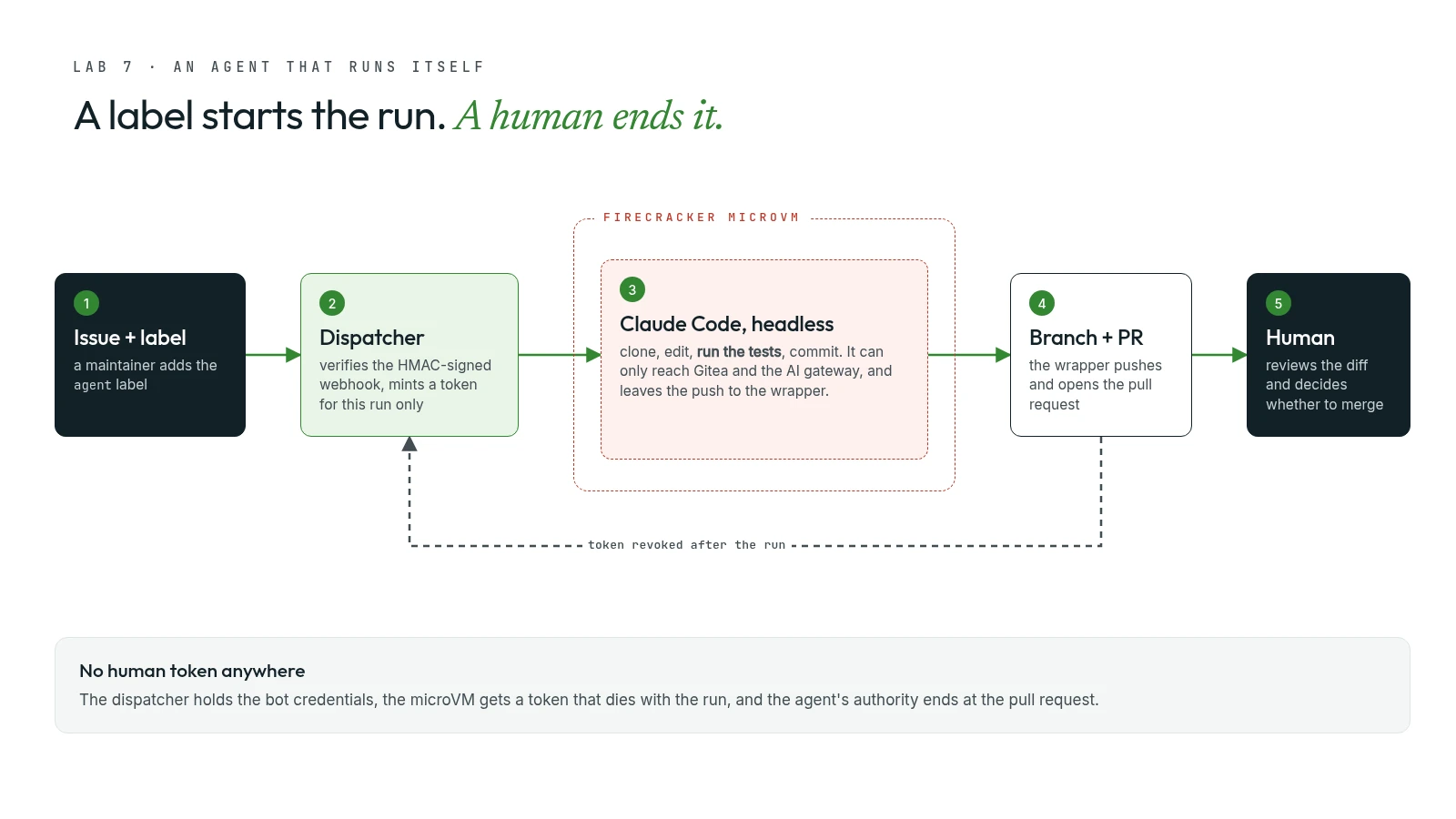
The workshop says it plainly, and I agree: the hard part isn't asking a model to write code; it's doing that safely. The safety comes from four limits:
- No human token anywhere. A dispatcher holds the bot's credentials. Nobody pastes a personal access token.
- No stored credentials in the VM. No AWS keys and no Kubernetes service-account token.
- A git token for this run only, created just before the run and revoked right after.
- Two destinations, and only two. The VM can reach the git server and the AI gateway. Nothing else.
The trigger matters too. The webhook is HMAC-signed, unlabelled issues are ignored, and the agent's authority ends at the pull request. Reviewing and merging stay human.
The issue asked for a POST /checkout endpoint with promo codes: SAVE10 (10% off), SAVE20 (20% off), FREESHIP (a flat $5 off), a 400 for unknown codes, and tests for every path. Watching the sandbox log was the most satisfying ten minutes of the day:
[claude] session start (model claude-sonnet)
[claude] tool Read: /app/repo/app.py
[claude] tool Read: /app/repo/test_app.py
[claude] tool Edit: /app/repo/app.py
[claude] tool Edit: /app/repo/test_app.py
[claude] tool Bash: pytest -v
[claude] tool Bash: git add app.py test_app.py && git commit -m "Add POST /checkout endpoint with promo code support"
[claude] I have not pushed or opened a PR. The wrapper will handle that.
[claude] done: success (10 turns)
Two things stand out. The model ran the tests itself before committing, and it respected the contract: it committed but left the push and the pull request to the wrapper, which is what holds the token. About two minutes after I labelled the issue, the bot had commented a link to a pull request with one commit, 97 lines added across two files, and a test summary in the description:
6 passed, 1 warning in 0.21s
That pull request is also where I'd push back on the workshop a little, because "tests passed" isn't the end of the story:
- The warning was a deprecation (
StarletteDeprecationWarning, about Starlette's test client andhttpx). Green tests can still ship something you'll have to fix later. That's what the human reviewer is for. - The bot's commit wasn't signed ("There is no key available to sign this commit"), and the pull request showed no required reviewers and "can be merged automatically". In production I'd sign the bot's commits and protect the main branch so its pull requests need an approving review.
- What the reviewer sees may not be what the agent read. The issue body included placeholders like
<number>and<optional promo code>. When Gitea rendered the issue, it treated them as HTML tags and dropped them, so the page showed{"subtotal": , "code": ""}. When an issue is effectively a prompt, write examples as code so humans and agents read the same text.
My own threat-model note, which the workshop doesn't spell out: the issue body is untrusted input to an agent that can write code. That's a prompt-injection surface. The label is the real trust gate, so only maintainers should be able to add it, which matters most on public repositories. And because the VM can still reach the AI gateway, which doesn't authenticate callers, a hijacked run could spend model tokens. But that's about all it could do: no AWS access, no other network destinations, a token that dies with the run, and a pull request a human must approve. Compare that with the common habit of running coding agents on a laptop or CI runner with a developer's personal token and the whole internet within reach.
What I'm taking home#
- Put the security in the platform, not the prompt. Every guarantee that mattered here was enforced by infrastructure: a gateway, a policy, a network rule, a VM boundary. Prompts are suggestions; policies are rules.
- Give agents no credentials, then give tools only what they need. By the end, the agent itself held no AWS permissions. The MCP server could read orders, the code broker could read a slice of them, and the sandbox could reach nothing.
- Put a protocol-aware gateway in front of tools. Per-tool, per-person permissions are only possible when the proxy understands
tools/listandtools/call. - Know what a cached tool list delays. At the gateway, a revoked tool is refused on the very next call; a newly granted one only shows up in a new conversation. Make sure your own gateway checks every call, not just the list.
- Don't trust the model with dates, arithmetic or its own summary. Pass in today's date, compute numbers in code, and show users the tool arguments, not just the output.
- Keep a human at the merge button. Autonomy that ends at a pull request is autonomy you can live with.
This connects directly to how I build. In Okione, my DevSecOps copilot, no model output reaches the user until deterministic checks and an independent judge have passed it; this workshop applies the same instinct at the infrastructure layer instead of the application layer. I'll be borrowing the gateway-plus-sandbox pattern for my own agents.
This post is based on AWS's Secure AI Agents on Amazon EKS workshop, run at an AWS-hosted event using Workshop Studio accounts that are deleted afterwards. The architecture diagrams here are my own; the commands and outputs come from my run, lightly trimmed.